Real Chromium pages
Modern Chromium rendering, site isolation, permissions, downloads, and full web compatibility through Castlabs Electron.
The complete browser
Everything Minova 1.0.5 brings together, from three complete interfaces and Liquid Glass to private local AI, precise audio controls, and protected playback.
The familiar workflows people rely on, built into Minova's own focused desktop shell.
Modern Chromium rendering, site isolation, permissions, downloads, and full web compatibility through Castlabs Electron.
Navigate directly or search from one field, with suggestions from recent pages and previous searches as you type.
Continue with regular tabs after restarting. Private tabs are intentionally never written into the saved session.
Open, close, pin, restore, reorder through normal workflows, and close the final tab to exit the browser.
Browse recent history and saved bookmarks directly from the three-dot menu or dedicated management pages.
Native find-in-page results, printing, download tracking, and quick access to completed files.
Choose vertical contexts, familiar horizontal tabs, or Minova's focused Safari-style arrangement.
Use a collapsible left rail with vertical tabs, live favicons, workspace colors, and focused commands.
Keep traditional horizontal tabs while retaining Minova's themes, extensions, passwords, media tools, and Streaming Mode.
Use traffic-light controls, a centered Smart Search field, integrated extension actions, and rounded tabs below the toolbar.
Add layered translucency, blur, highlights, and saturation with practical contrast and a restrained light appearance.
Create, rename, recolor, reorder, and delete contexts. Personal, Work, and Gaming are starters, not permanent restrictions.
Move between workspaces without destroying their tabs. Each context remembers its active page and arrangement.
Tile two normal webpages side by side inside one Minova window, with native views that resize and remain independently interactive.
Preview Minova's interface choices, learn the browser's power features, and finish with secure password import. The tour is always replayable.
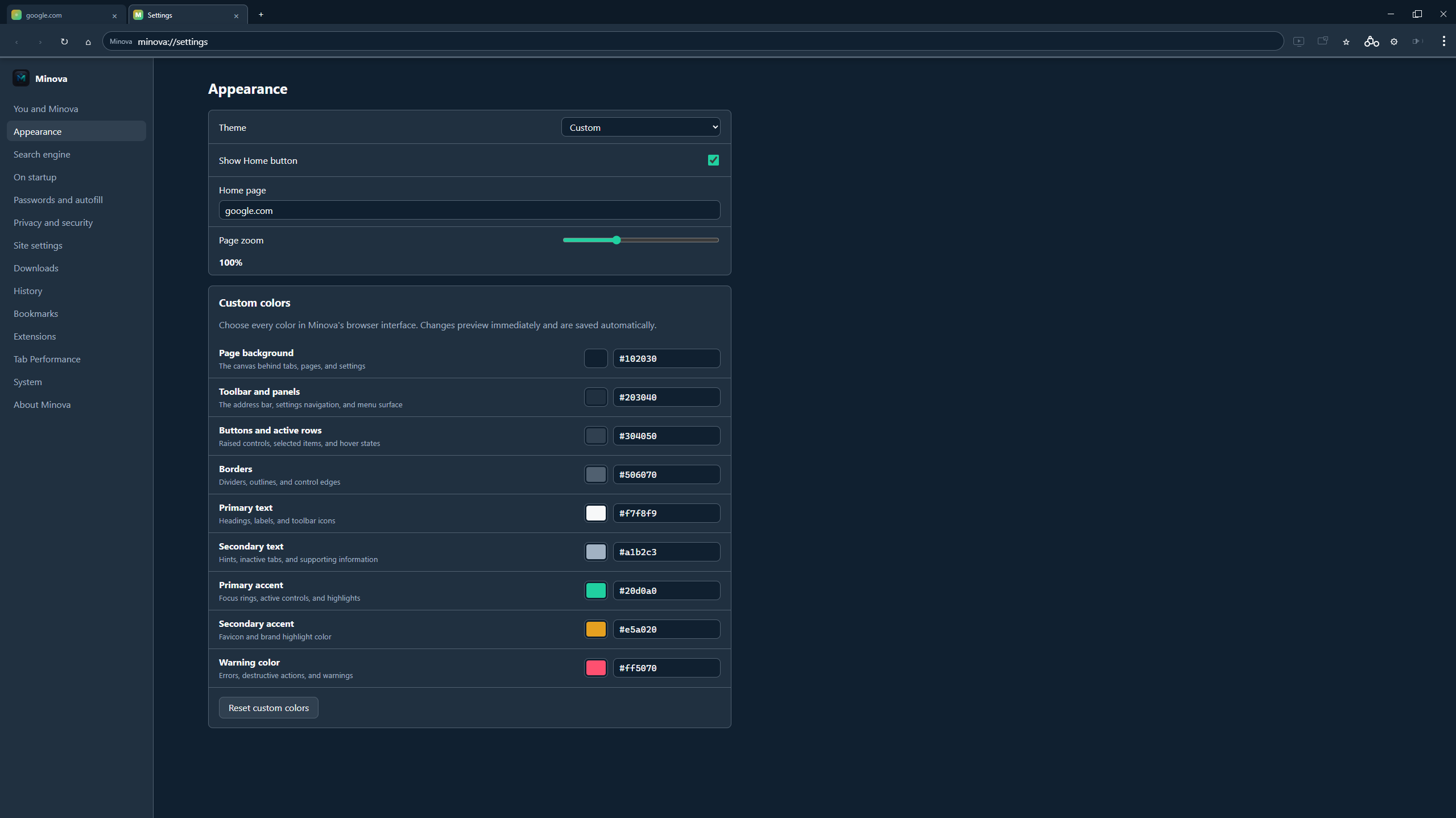
Change the interface at a deeper level than a single accent switch.
Follow the system, choose light or dark, use Liquid Glass with Safari UI, or unlock a fully custom theme.
Control page background, panels, raised controls, borders, primary and secondary text, two accents, and warnings.
See color changes immediately in tabs, controls, settings, menus, and internal pages.
Add your own destinations to the New Tab page alongside the built-in quick links.
Use Google, Bing, DuckDuckGo, Brave, or define your own search URL.
Choose a home page and decide whether Minova restores your session, opens New Tab, or starts somewhere specific.
Useful protections that stay understandable and close to the browsing experience.
Filter common advertising and tracking requests with locally cached, regularly refreshed block lists.
Credentials are protected using Electron safeStorage backed by Windows encryption, never written to a plaintext password file.
Saved logins for the current site appear where account forms need them, with autofill controls in Settings.
Browse in an isolated private session that does not enter Minova's saved history or session restore.
Control notifications, camera, microphone, location, pop-ups, and Do Not Track behavior.
Delete browsing data on demand, clear all history at once, or erase browser data automatically when Minova closes.
A practical Chrome-extension layer with clear expectations about Electron compatibility.
Load compatible extensions with common runtime, storage, tabs, windows, permissions, cookies, and context-menu APIs.
Paste a Web Store URL or extension ID and let Minova fetch and install the extension package.
Developers can select a local folder containing a manifest and test an extension directly.
Pin compatible extension icons beside the address bar and open their popups without leaving the current page.
A private, page-aware assistant that runs through WebGPU on your own computer. Page text and conversations are processed locally instead of being sent to an AI service.
The model downloads once, is stored in Minova's isolated IndexedDB partition, and can keep working offline after setup. WebGPU provides hardware acceleration without Ollama or another background application.
Enable Use page to ask grounded questions about the active webpage. Minova bounds and sanitizes the reference so page instructions cannot take control of the assistant.
Summarize a page, extract key points and action items, build an outline, identify useful structured data, or analyze claims against the evidence actually present on the page.
Select text on a webpage to explain, simplify, rewrite, or proofread it. Minova can also draft a concise reply while avoiding invented personal details.
Turn long reading into a structured study guide or a five-question quiz with an answer key, all grounded in the active page.
Open two normal webpages in Split View and choose Compare tabs. The assistant highlights common ground, differences, contradictions, and unique details from both pages.
Getting started
Privacy note: Normal conversations are saved locally for continuity. Conversations started from a private tab are kept out of persistent assistant history.
Per-tab volume, transparent loudness control, and detailed tone shaping in one toolbar panel. Settings follow compatible HTML audio and video without altering the original media file.
Raise compatible media from 100% to 300% for unusually quiet sources. Start low and increase gradually to protect your hearing and speakers.
The compressor reduces harsh volume jumps. Threshold decides when it works; ratio controls strength; knee smooths the transition; attack and release control how quickly it reacts and recovers.
Each band exposes frequency, gain, and Q. Frequency chooses the tone, gain boosts or cuts it, and Q controls whether the adjustment is broad or narrow.
Auto headroom lowers the preamp when EQ boosts could clip. The safety margin adds extra protection, while Output provides a deliberate final level adjustment.
Start with Flat, Bass Boost, Vocal Clarity, or Night Mode. Name and save custom settings, update them later, or delete presets you no longer need.
The AudioContext follows playback and suspends while media is idle. Audio Studio reports active sources, compressor reduction, unavailable players, and protected-media limitations.
Getting started
Compatibility: Some protected or cross-origin players do not expose their audio graph. Streaming Mode uses the certified playback path and therefore cannot be processed by Minova Audio Studio.
Keep video useful beyond the tab, including services that require a certified protected-media path.
Protected services can use the installed Microsoft-signed Edge playback path while Minova's tabs and toolbar remain attached.
Minova recognizes major services and can suggest Streaming Mode when direct protected playback is unavailable.
Pop compatible media into a compact window that stays visible over games and other applications.
Normalize loudness, shape ten parametric EQ bands, protect boosted curves with automatic headroom, and save custom presets directly from Minova's toolbar.
Tab state tracks active audio and video so media remains visible and is not suspended unexpectedly.
Tabs display each site's real icon, making YouTube, Netflix, Steam, and everyday pages easy to distinguish.
Minova saves resources without treating every background tab the same.
Choose standard or custom timeouts and wake suspended tabs without losing their URL or position.
Downloads, audible media, video, capture, fullscreen pages, unsaved forms, uploads, and pinned tabs are protected.
Keep important domains awake with a simple website exclusion list.
Minova checks GitHub releases, downloads updates quietly, and lets the user install now or wait until normal exit.
Check from the three-dot menu or About Minova and see clear checking, downloading, ready, and up-to-date states.
GPL-licensed source, repeatable installer builds, release metadata, checksums, and automated browser regression tests.
See it for yourself
Download the latest release or help shape what comes next.